

Kayonews-Modern accounting platforms can automate invoicing, expense tracking, bank reconciliation, financial reporting and other bookkeeping tasks. Some also offer payroll, inventory management, project accounting, payment processing and AI-powered financial insights.
But with dozens of accounting platforms competing for small-business customers, choosing the right one can be difficult.
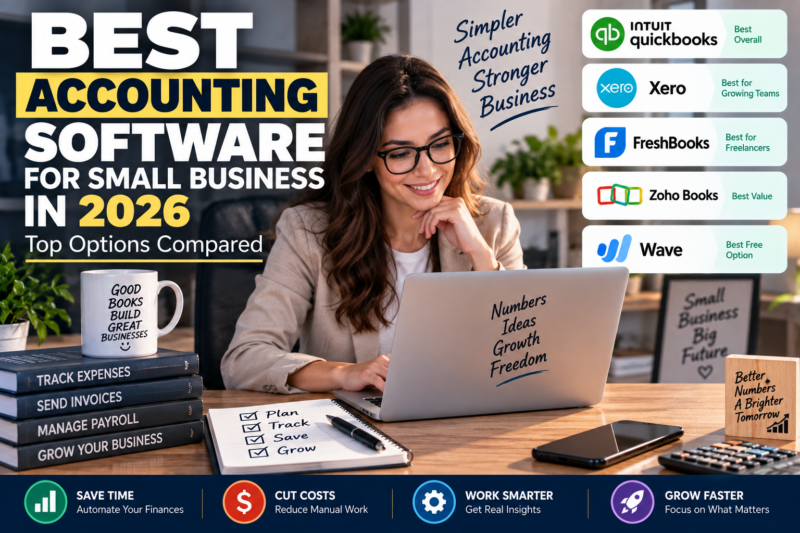
In this guide, we compare the best accounting software for small businesses in 2026, including QuickBooks Online, Xero, FreshBooks, Zoho Books and Wave.
Quick Answer: Best Accounting Software for Small Business
| Software | Best For | Starting Price* | Free Plan |
|---|---|---|---|
| QuickBooks Online | Best overall | $38/month | No |
| Xero | Growing teams | $25/month | No |
| FreshBooks | Freelancers & service businesses | ~$23/month | No |
| Zoho Books | Best value | ~$20/month | Yes, with limits |
| Wave | Best free option | Free/paid options | Yes |
*Prices and plan features can change. Verify current pricing before purchasing. Published 2026 comparisons currently place QuickBooks Online at $38/month for Simple Start, Xero around $25/month for its entry U.S. plan, FreshBooks around $23/month, and Zoho Books around $20/month, although promotions and regional pricing may differ.
1. QuickBooks Online — Best Overall
Best for: Most U.S. small businesses
Starting price: About $38/month for Simple Start
QuickBooks Online remains one of the strongest choices for small businesses in the United States.
A September 2026 comparison from Fit Small Business selected QuickBooks Online as its strongest overall option, highlighting its accounting depth, reporting, integrations, scalability and security.
NerdWallet also lists QuickBooks Online as its best accounting software for most small businesses.
Key features
- Income and expense tracking
- Invoicing
- Bank feeds
- Bank reconciliation
- Financial reports
- Accounts payable
- Accounts receivable
- Inventory on higher-tier plans
- Project profitability
- Payroll add-ons
- Large third-party app ecosystem
- AI-assisted financial insights
QuickBooks can also connect with hundreds of business applications. CNBC Select notes that QuickBooks integrates with more than 750 apps and platforms, including PayPal, Square, Etsy, Shopify and Amazon.
Pros
- Comprehensive accounting features
- Large accountant/bookkeeper ecosystem
- Strong reporting
- Extensive integrations
- Scales with growing businesses
- Strong U.S. market support
Cons
- More expensive than some competitors
- Payroll is generally an additional cost
- User limits vary by plan
- The number of features can feel overwhelming for very small businesses
Best for
Small and growing U.S. businesses that want accounting software they are unlikely to outgrow quickly.
2. Xero — Best for Growing Teams
Best for: Businesses with multiple users
Xero is one of QuickBooks Online’s strongest competitors.
One major advantage is its emphasis on collaboration and multi-user accounting. Recent 2026 comparisons highlight Xero as a strong choice for growing teams and businesses that want broad user access.
Key features
- Bank reconciliation
- Invoicing
- Expense management
- Financial reporting
- Inventory
- Project accounting
- Multi-currency support
- Accountant access
- Business integrations
Xero is also particularly attractive for businesses operating internationally.
Pros
- Strong collaboration features
- Clean interface
- Good bank reconciliation
- Strong international capabilities
- Useful for growing teams
Cons
- Some features depend on the selected plan
- U.S. payroll may require a separate provider
- Entry plans can have usage limits
Best for
Startups, agencies and growing businesses that need multiple people to access the accounting system.
3. FreshBooks — Best for Freelancers and Service Businesses
Best for: Freelancers, consultants and agencies
FreshBooks takes a different approach from traditional accounting platforms.
Its strength is client billing and service-based business workflows.
Key features
- Professional invoices
- Online payments
- Time tracking
- Project management
- Expense tracking
- Client management
- Financial reports
- Recurring invoices
- Estimates
FreshBooks is particularly useful when a business bills customers based on hours, projects or recurring services.
Pros
- Easy to use
- Excellent invoicing
- Strong time tracking
- Good client management
- Designed for service businesses
Cons
- Less suitable for inventory-heavy businesses
- Some advanced features require higher plans
- Can become more expensive as a business grows
Best for
Freelancers, consultants, creative agencies, marketing agencies and professional service providers.
4. Zoho Books — Best Value
Best for: Price-conscious businesses and companies using Zoho
Zoho Books is an attractive option for businesses that want accounting functionality without paying QuickBooks-level pricing.
NerdWallet lists Zoho Books as its best choice for an all-in-one business software suite, while other 2026 comparisons highlight its value and automation capabilities.
Key features
- Invoicing
- Expense management
- Bank reconciliation
- Inventory
- Financial reports
- Tax management
- Automation
- Customer management
- Vendor management
- Integration with other Zoho products
Pros
- Competitive pricing
- Free option in some circumstances
- Strong automation
- Good ecosystem
- Useful inventory capabilities
Cons
- Some advanced features require higher plans
- Best value comes when using other Zoho applications
- U.S. users should verify tax and payroll requirements
Best for
Small businesses that want affordable accounting plus access to a broader business software ecosystem.
5. Wave — Best Free Accounting Software
Best for: Freelancers and very small businesses
Wave is particularly attractive to entrepreneurs who want to minimize monthly software costs.
Recent 2026 comparisons continue to identify Wave as a strong free or low-cost option for basic accounting.
Key features
- Income tracking
- Expense tracking
- Invoicing
- Basic bookkeeping
- Financial reports
- Receipt management
Pros
- Free core accounting option
- Easy to start
- Good for simple businesses
- Useful for freelancers
Cons
- Less advanced than QuickBooks
- Fewer advanced business-management features
- May not be ideal for complex businesses
Best for
Solo entrepreneurs, freelancers and micro-businesses with straightforward accounting needs.
QuickBooks vs. Xero vs. FreshBooks vs. Zoho vs. Wave
| Feature | QuickBooks | Xero | FreshBooks | Zoho Books | Wave |
|---|---|---|---|---|---|
| Invoicing | Excellent | Excellent | Excellent | Excellent | Good |
| Expense tracking | Excellent | Excellent | Good | Excellent | Good |
| Bank reconciliation | Excellent | Excellent | Good | Excellent | Good |
| Reporting | Excellent | Excellent | Good | Excellent | Basic |
| Inventory | Strong | Strong | Limited | Strong | Limited |
| Project accounting | Strong | Strong | Excellent | Good | Limited |
| Multi-user teams | Strong | Excellent | Good | Strong | Limited |
| Free plan | No | No | No | Yes* | Yes |
| Best for U.S. SMBs | ⭐⭐⭐⭐⭐ | ⭐⭐⭐⭐ | ⭐⭐⭐⭐ | ⭐⭐⭐⭐ | ⭐⭐⭐ |
| Best for freelancers | ⭐⭐⭐⭐ | ⭐⭐⭐⭐ | ⭐⭐⭐⭐⭐ | ⭐⭐⭐⭐ | ⭐⭐⭐⭐⭐ |
*Free-plan availability and eligibility vary by product and region.
How Much Does Small Business Accounting Software Cost?
Accounting software pricing in 2026 ranges from free options to hundreds of dollars per month for advanced plans.
A recent pricing comparison puts the market broadly into several tiers:
- Wave: free/low-cost
- Zoho Books: roughly $20/month starting tier
- FreshBooks: roughly $23/month
- Xero: roughly $25/month
- QuickBooks Online: roughly $38/month
- Advanced accounting platforms: significantly more
However, the monthly subscription is only part of the total cost.
Businesses should also consider:
- Payroll
- Payment processing
- Additional users
- Inventory modules
- Premium integrations
- Accountant access
- Advanced reporting
- Tax features
A $20/month platform can ultimately cost more than a $40/month platform if essential features require expensive add-ons.
What Features Should Small Businesses Look For?
1. Bank feeds
Your accounting software should connect to your business bank accounts and automatically import transactions.
This can dramatically reduce manual data entry.
2. Bank reconciliation
Reconciliation helps ensure that the accounting records match the actual bank activity.
This is essential for maintaining accurate financial statements.
3. Invoicing
Look for:
- Professional invoices
- Recurring invoices
- Online payments
- Automated reminders
- Invoice tracking
4. Expense management
Good accounting software should make it easy to categorize and track business expenses.
5. Financial reports
At minimum, look for:
- Profit and loss statement
- Balance sheet
- Cash-flow report
- Accounts receivable
- Accounts payable
6. Tax support
The software should make it easier to organize information needed for tax preparation.
It does not necessarily replace a CPA or tax professional.
7. Integrations
Your accounting platform may need to connect with:
- Banks
- Credit cards
- Payroll
- E-commerce
- Payment processors
- CRM software
- Inventory systems
- Expense management
- Tax software
8. Security
Financial information is highly sensitive.
Look for strong security controls, access management and appropriate data-protection policies.
Best Accounting Software by Business Type
Freelancer
Winner: FreshBooks or Wave
Freelancers generally need simple invoicing, expense tracking and payment collection.
Consultant
Winner: FreshBooks
Time tracking and project billing can be particularly useful.
E-commerce business
Winner: QuickBooks Online or Xero
Businesses selling through Shopify, Amazon or other platforms should prioritize integrations and inventory management.
Growing agency
Winner: QuickBooks Online or Xero
Both provide stronger scalability and collaboration than basic accounting products.
Very small business
Winner: Wave
If the business has simple accounting needs, a free option can keep operating costs low.
Zoho-based business
Winner: Zoho Books
The integration with other Zoho applications can create a more unified business environment.
Best Accounting Software for a New Business
If you are launching a business in 2026, you do not necessarily need the most advanced accounting system.
Start with your actual requirements.
Ask:
- How many people need access?
- Do I need payroll?
- Do I sell physical products?
- Do I need inventory?
- Do I bill clients by the hour?
- Do I need recurring invoices?
- Does my accountant already use a particular platform?
- Will I sell internationally?
- Do I need sales-tax automation?
- How much can I afford each month?
These questions can eliminate many unsuitable options.
Should You Choose QuickBooks or Xero?
This is one of the most common decisions for small businesses.
Choose QuickBooks if:
- You operate primarily in the U.S.
- You want a large accountant ecosystem
- You need extensive integrations
- You want comprehensive reporting
- You expect the business to grow
Choose Xero if:
- Multiple employees need access
- Collaboration is important
- You operate internationally
- You want a clean accounting interface
- You want strong bank reconciliation
Recent 2026 comparisons consistently position QuickBooks as the stronger overall U.S. option and Xero as a leading alternative for growing or multi-user businesses.
Is Free Accounting Software Good Enough?
Sometimes.
A freelancer with ten monthly transactions does not necessarily need an expensive accounting platform.
But a business with:
- Employees
- Inventory
- Hundreds of transactions
- Multiple bank accounts
- Sales tax
- Multiple locations
- Significant revenue
may quickly outgrow free software.
The cheapest option is not always the least expensive option over the long term.
AI and Accounting Software in 2026
AI is becoming an increasingly important feature in accounting software.
Modern platforms can help with:
- Transaction categorization
- Receipt capture
- Anomaly detection
- Financial questions
- Reconciliation assistance
- Cash-flow insights
- Automated workflows
QuickBooks, for example, has AI-powered features designed to identify unusual transactions and financial trends.
However, AI should be viewed as an assistant rather than an autonomous accountant.
Businesses should still have humans review:
- Tax treatment
- Payroll
- Unusual transactions
- Reconciliation exceptions
- Financial statements
- Year-end accounting
Recent 2026 analysis similarly emphasizes that most AI accounting systems still provide assisted accounting rather than completely autonomous bookkeeping.
How to Switch Accounting Software
Switching platforms can be disruptive, so plan carefully.
Step 1: Export your existing data
Keep copies of:
- Transactions
- Customers
- Vendors
- Invoices
- Bills
- Chart of accounts
- Financial reports
Step 2: Choose a migration date
Many businesses switch at the beginning of a fiscal year or accounting period.
Step 3: Reconcile opening balances
Make sure the starting balances match the old system.
Step 4: Connect your bank accounts
Verify that transactions are importing correctly.
Step 5: Test invoices
Create test invoices and confirm payment workflows.
Step 6: Have your accountant review the setup
This is especially important when changing systems during an active tax year.
Common Accounting Software Mistakes
Choosing based only on price
A cheap plan may lack the features your business actually needs.
Ignoring user limits
Some entry-level plans restrict the number of users.
Forgetting payroll costs
Payroll may be a separate subscription.
Not checking integrations
Make sure your e-commerce platform, bank and payment processor are supported.
Switching too frequently
Migration takes time.
Choose a platform that can support your expected growth.
Not involving your accountant
Your accountant may already have a preferred platform or workflow.
Our 2026 Rankings
🥇 Best Overall: QuickBooks Online
Best combination of accounting depth, reporting, integrations and scalability for most U.S. small businesses.
🥈 Best for Growing Teams: Xero
Strong collaboration and international capabilities.
🥉 Best for Service Businesses: FreshBooks
Excellent invoicing, time tracking and project billing.
💰 Best Value: Zoho Books
Strong features for businesses seeking a broader Zoho ecosystem.
🆓 Best Free Option: Wave
Good starting point for freelancers and very small businesses with simple financial needs.
Final Verdict
For most U.S. small businesses in 2026, QuickBooks Online is the safest overall choice because it combines comprehensive accounting features, reporting, integrations and a large accountant ecosystem.
Xero is an excellent alternative for growing teams and businesses that prioritize collaboration.
FreshBooks is particularly attractive for freelancers and service businesses.
Zoho Books offers strong value, especially for companies already using the Zoho ecosystem.
And if keeping costs as low as possible is the priority, Wave is worth considering for straightforward accounting needs.
The most important rule is simple:
Choose the accounting software that fits your business today while leaving enough room to grow tomorrow.
Before purchasing, verify current pricing, plan limits, integrations, regional availability and add-on costs directly with the provider.
Disclaimer: This article is for informational purposes only and does not constitute accounting, tax, financial or legal advice. Software pricing, features, promotions and availability can change. Consult a qualified accountant or tax professional for advice specific to your business. (*)
Editor : Fanda Yosephta